Synthflow Call Hangup Reasons
Last updated: August 8, 2025
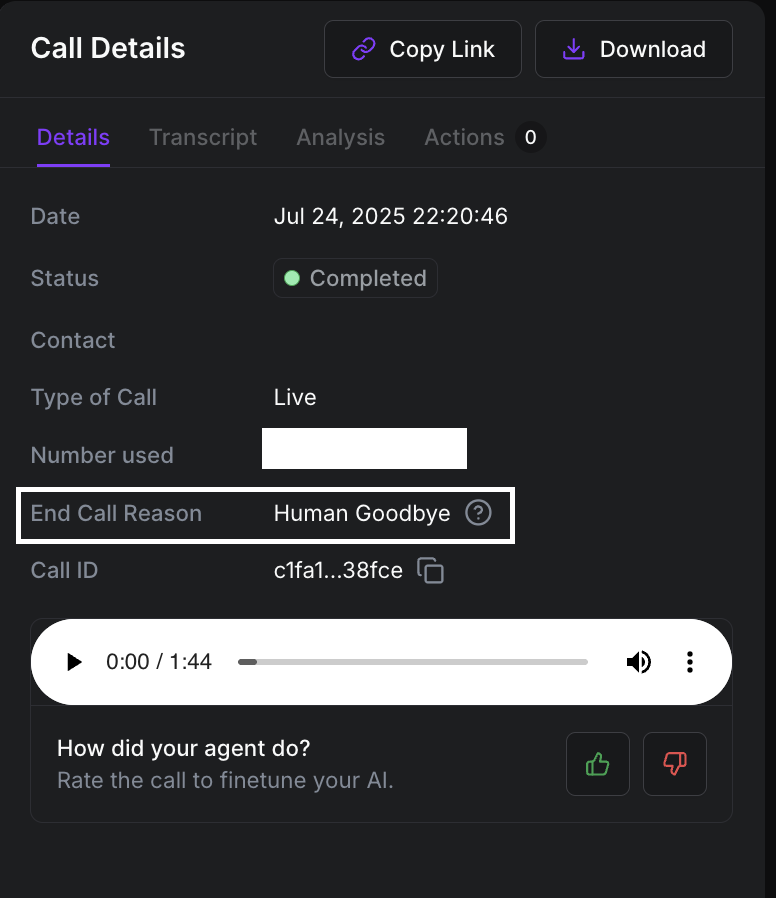
Every call is associated with an "End Call Reason," which helps explain what happened during the call. You can find this information by navigating to the Agent of your choice, then selecting "Calls," and finally clicking on the specific call you wish to debug.
End Call Reason | Description | Next Steps | Possible Call States At Hangup |
Insufficient Minutes | This issue occurs when you've used up all the minutes included in your current plan. | What You Can Do If you're on the Starter plan, you can upgrade to a plan with more minutes that better fits your needs: Go to: Plans starting from the Pro tier also let you enable Pay-As-You-Go, which automatically recharges your balance to prevent service interruptions. To turn this on: Go to: Once enabled, make sure to set:
This ensures your assistant stays active without any downtime. | Failed |
429: Rate limit exceeded. Your rate limit per minute is XX. Contact Sales to increase the rate limit. | This error occurs when the number of calls you're attempting to place exceeds the limit allowed by your current plan. | You can either upgrade to a plan that supports a higher number of concurrent calls or implement call queuing on your end to prevent failures. If you require additional concurrency capacity, we recommend reaching out to our Sales team to explore custom solutions tailored to your needs. | Failed |
608: Rejected | This error typically occurs when the end-user has enabled a spam-blocking feature, leading the operator to reject the call. | This error typically occurs when the end-user has enabled a spam-blocking feature, causing the call to be rejected by the carrier or operator. To reduce the likelihood of this happening: | Failed |
404: Not Found | The destination number may be invalid or out of service. | Please verify the accuracy of the destination number. | Failed |
487: Request Terminated | The destination number disconnected the call without answering it. | Retry again after some time | Failed |
400: It was not possible to start the call because of a Twilio error: Unable to create a record: The caller ID phone number provided, +123456789, is not yet verified for your account. | On a Twilio trial account, every outgoing number (both the “To” destination and the “From” caller ID) must be added and verified in your console before you can use it. This error indicates that the phone number is not verified | Verify the Phone number that you are dialing or the caller ID that you are using on the Twilio platform. | Failed |
400: It was not possible to start the call because of a Twilio error: Unable to create a record: Account not allowed to call +123456789 | This error occurs when you are unable to dial a particular number because of the following reasons:
|
Twilio blocks international calls by default to prevent abuse. If +123456789 is in a country you haven’t explicitly allowed, the call will be blocked. Fix: Go to the Twilio Voice Geographic Permissions settings. Enable outbound calling for the specific country or region.
If you’re using a Twilio trial account, you can only call phone numbers that have been verified manually in your Twilio Console. Fix: Go to your Twilio Console → Verified Caller IDs, and add the number you're trying to call.
Some countries require local compliance (e.g., caller ID registration or regulatory documents). Fix: Contact Twilio Support or check country-specific requirements in Twilio's regulatory guidelines. | Failed |
400: It was not possible to start the call because of Twilio error: Invalid 'to' phone | This error occurs since the number you are trying to dial is incorrect or incorrectly formatted. Note - We support dialing in E.164 format only. | Ensure the number that you are dialing is correct. | Failed |
400: Error creating the agent: Too many requests to GHL API | This error occurs when you are making multiple API requests to your GHL Custom actions. |
| Failed |
400: Error creating the agent: Illegal header value b'Bearer | This error occurs when the Real Time Booking action is linked to the assistant, but the relevant account or the subaccount is not linked to the custom action. | If you are using GHL for Real-Time Booking, ensure the right subaccount is connected to the custom action, which allows the assistant to execute this action without errors. You can verify the connection by navigating to Integrations -> Third parties -> Go High Level or Cal.com is connected. Disconnect and connect again before retrying. | Failed |
403: Forbidden | This error can occur if you are dialing a destination that the custom Twilio account doesnt support. | Follow the instructions in this article to adjust the Geo-permissions to enable dialing towards a destination of your choice. | Failed |
The Voice ID is not accessible to this API key. Please add this voice to your ElevenLabs voice library. | This error occurs when you have connected your custom ElevenLabs account and are using a Voice that is not available in your ElevenLabs account. | Ensure the Voice that is available in your ElevenLabs account is linked to the assistant. | Failed |
Background noise environment is required when the background noise volume is greater than 0. Go to the agent settings and select a background noise environment or set the volume to 0 | This error occurs when the Background noise is selected but the volume is set to 0. | Adjust the slider to a non-zero value. Navigate to Assistant -> Configure -> Call configuration -> Background noise -> Change the value to a non-zero value. | Failed |
Forbidden | This error can occur if you are dialing a destination that we do not support. | Connect your own Twilio account to be able to make calls to a destination that we do not support. | Failed |
Something went wrong | This error can occur for a multitude of reasons. Reach out to our Support Team for help. | Reach out to the Support team with:
| Failed |
Call Failed / Unknown error | This error needs to be investigated as the underlying error could be unique. | Reach out to the Support team with:
| Failed |
You have exceeded the token rate limit of your current OpenAI pricing | This error occurs when you have connected your own OpenAI account, and this account has hit the maximum number of tokens (input + output) allowed per minute or day, according to the rate limits of your OpenAI pricing tier. |
| Failed |
LLM token rate limit exceeded : Azure OpenAI token‐per‐minute limit exceeded; retry after X seconds or upgrade tier. | This occurs when your Azure OpenAI has exceeded the token-per-minute (TPM) limit allowed by your current Azure OpenAI resource tier. | Upgrade your tier / request a quota increase | Failed |
Human Goodbye | This indicates the call is completed successfully, and the person disconnected the call. | Completed | |
Voicemail | This indicates the call was answered by voicemail. | Completed |